My Pay Market
Personal expense tracker with receipt OCR
 Kotlin
  Jetpack Compose
  Material 3 Room ML Kit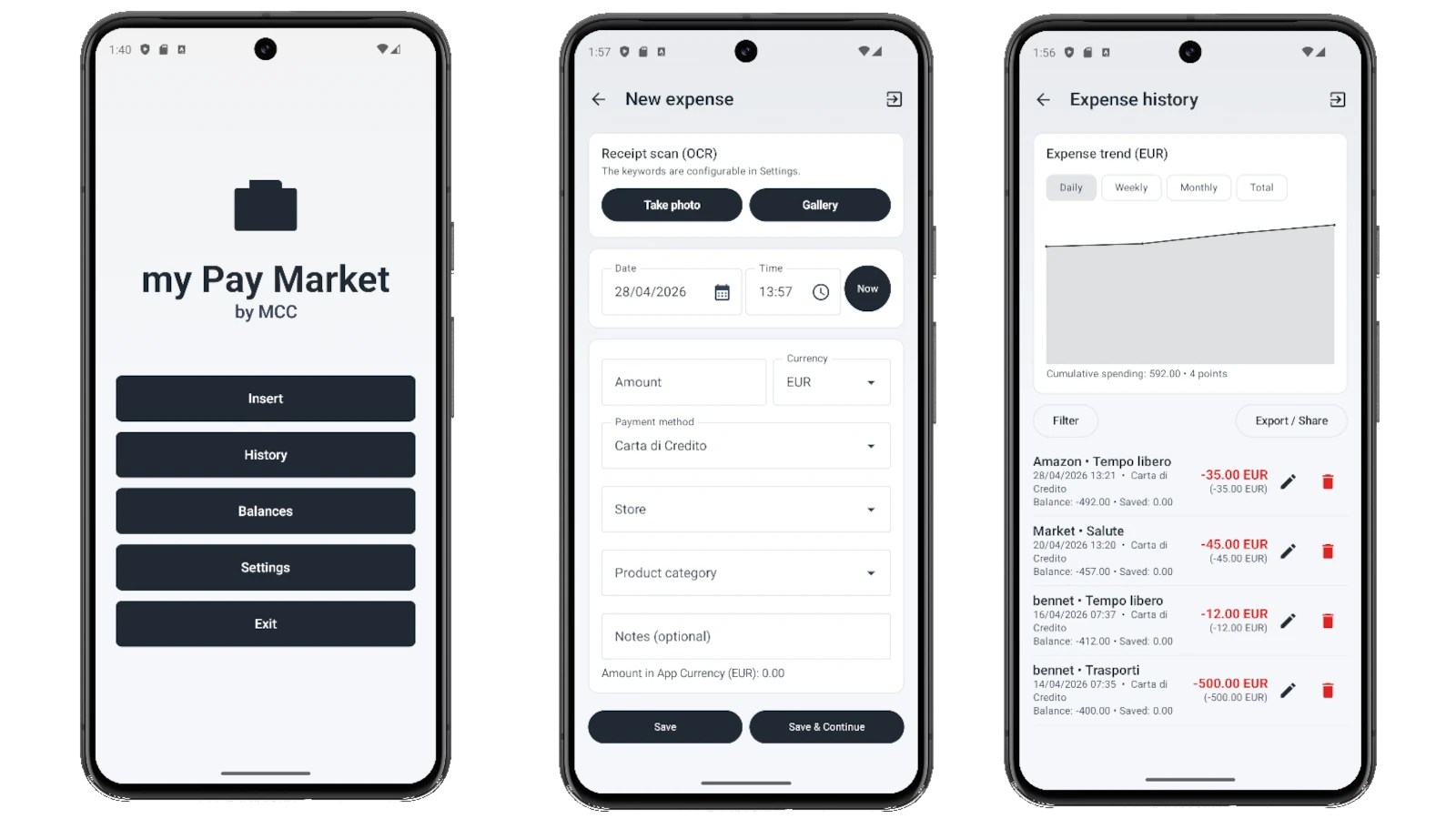
My Pay Market is the personal expense tracker of the collection. The app lets you record each expense with date/time, amount, currency, payment method, store and category — all editable combos, no rigid lists. "Now" button for quick timestamp, preview of the amount converted to app-currency.
Flagship feature: **receipt OCR**. Take a photo of the receipt (camera or gallery) and Google ML Kit Text Recognition extracts the text on-device — no network, no cloud, receipt never leaves the phone. An internal keyword-based parser identifies amount (TOTAL line), date/time, store and payment method. The keywords used to recognize each field are fully configurable in Settings → "OCR Settings" — you decide what to search for.
History shows the chronological list with detail, edit, delete. Chart aggregates by Daily / Weekly / Monthly / Yearly / Total. Export to CSV or XLSX (with SUM formulas in Excel cells) and standard Android share Intent to send the file via mail / WhatsApp / Drive.
Balances screen computes Balance / Credit / Accumulation of the current period with periodic refill rules: expenses subtract from Accumulation first, then Balance; at period end positive Balance flows into next Accumulation, negative is absorbed; manual refills are CREDIT entries that offset net expenses of the period. All movements visualized as double-entry (DEBIT expense red, CREDIT refill green) with Debit/Credit columns in exports.
Same stack as the other MCC Androids: Kotlin + Jetpack Compose + Material 3 + Room + DataStore + Apache POI for Excel + ML Kit Text Recognition. Native IT/EN multilingual via AppCompat (`AppCompatDelegate.setApplicationLocales`). 4 palettes reused from MyVote (Default Violet / Sunset / Ocean / Forest) + light/dark/system theme.
Features
- Fast expense form: date/time + Now, amount, currency, method, store, category, notes
- Creatable combos: new stores/categories/methods added on the fly
- On-device receipt OCR (Google ML Kit) — no network, receipt never leaves the phone
- Fully configurable OCR keywords (per Amount / Date / Store / Payment)
- Chronological history with detail, edit, delete
- Chart with Daily / Weekly / Monthly / Yearly / Total aggregation
- CSV and XLSX export (with Excel SUM formulas)
- Share file via Intent.ACTION_SEND (email, WhatsApp, Drive, etc.)
- Periodic balances (daily / weekly / monthly) with automatic refill
- Double-entry: DEBIT expenses red, CREDIT refills green, Debit/Credit columns in export
- Automatic currency conversion (configurable rate)
- 4 color palettes (Default / Sunset / Ocean / Forest) — coherent with other MCC Androids
- IT/EN multilingual with per-app language preferences (Android 13+)
Configuration
- App Currency (default displayed currency)
- Initial Credit + Refill Period (Daily / Weekly / Monthly)
- Stores / Categories / Payment methods CRUD
- Currencies with exchange rate (`rateToApp`)
- OCR keywords per recognized field (add/remove chips)
- Theme (System / Light / Dark) + Palette
- Language (System / Italian / English)
Technical prerequisites
- Android 8.0+ (API 26)
- Camera (for receipt scan) — optional, the app works without it
- Google Play Services + ML Kit Text Recognition available
- ~80 MB storage
- No account, no signup, no internet connection required